


Piano Tiles 2™ - Piano Game
4.11.67K Reviews
App Specs
- Version
- 1.12.4
- Updated On
- License
- Free
- Downloads
- 10,000,000+
- Developer
- Kooapps Games | Fun Arcade and Casual Action Games
- Categories
- Music
- Platform
- Android, iOS
Screenshots

 Analysis by AppCompare
Picture this: you're waiting for a bus, your mind is wandering, and you need something to keep you entertained. Enter Piano Tiles 2™, the little game that turns your fingertips into musical maestros. I've spent some good time tapping away, and here's my take on this addictive app.
What to expect from the tapping
The appeal here is immediate: you watch a stream of tiles and react as it moves, so there is almost no learning curve before the first attempt. That makes it easy to try during a short break, but the simple rule can still become demanding when the pace picks up. I would think of it as a reflex game with a musical presentation, rather than a piano lesson. The tapping may build attention and timing, but it does not teach keyboard technique or how to read sheet music.
That distinction matters if you are choosing between this and a music-learning app. Those usually ask you to practice notes, songs, or technique; this is better when you want a quick challenge that happens to use piano sounds. It also differs from a conventional rhythm game built around a more elaborate controller-like layout: here, the core satisfaction comes from reacting cleanly to the tiles in front of you. If you enjoy chasing a better run without needing a long session, that focused loop is the main reason to give it a chance.
The Gameplay Experience
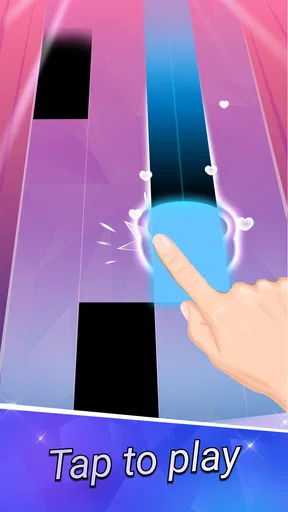
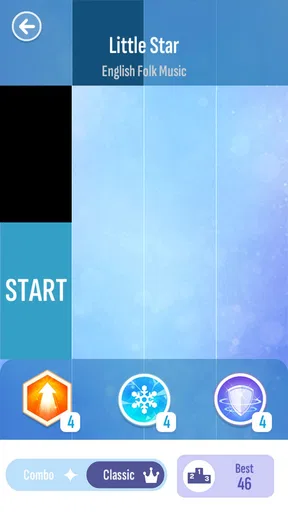
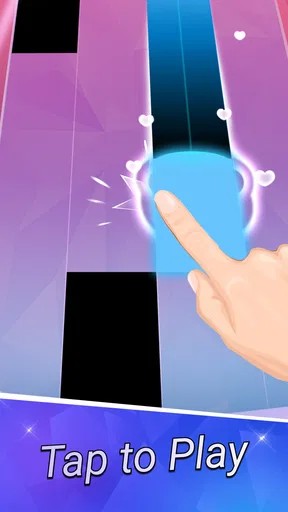
Let me tell you, the moment I opened Piano Tiles 2™, I was hooked. The game's concept is simple yet utterly engaging. You tap on black tiles as they scroll down the screen, all while avoiding the white ones. It sounds easy, but trust me, things get intense pretty quickly.
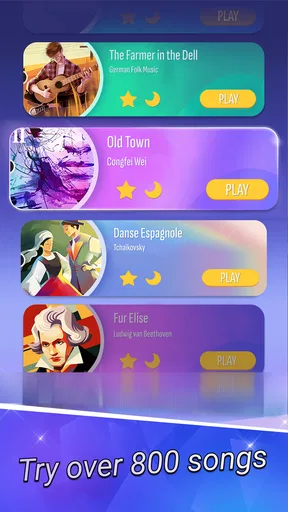
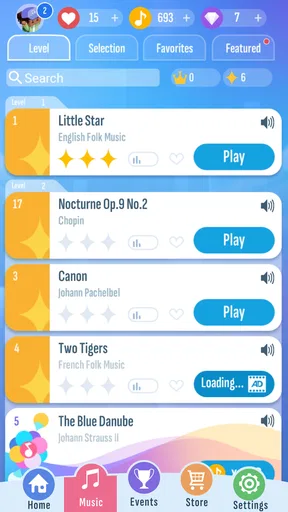
Each level presents a different song, and as the tempo speeds up, so does your heartbeat. It’s like trying to juggle while riding a unicycle—completely exhilarating! The variety of songs is impressive, ranging from classical to pop. This keeps the game feeling fresh every time you play.
Getting started without overthinking it
For a first-time player, I would begin with a calm moment rather than opening it in the middle of a noisy commute. Give the screen your full attention, make a short first attempt, and focus on following the tile pattern instead of trying to tap as fast as possible. The useful first win is not a high score; it is finishing a run with a clearer sense of how the timing feels. Once that clicks, a bus queue or a quiet few minutes between tasks becomes a natural place to play.
The game is free to download and is developed by Kooapps Games | Fun Arcade and Casual Action Games. It is rated Everyone, runs on Android 6.0 and later, and its current version is 1.8.23. The listed average is 4.3 from around 69,000 ratings, with roughly 1,500 written reviews and over 10 million installs. Those figures suggest that it has reached a broad casual audience, though they do not tell you whether its quick-reaction style will suit your own hands or patience.
Worth Reading Before You Choose

Baby Panda World Brings Quick Play to Modern Phones, but Its Game Library Feels Busy

ESPN’s Live Game View Makes Following Close Games Easier

QuizzLand Review: A Good Fit for Short Trivia Breaks, Not Every Player

Basketball Stars: Multiplayer Is Fast, but Can It Recover When Matches Go Wrong?

WEBTOON Turns Phone Updates Into a Better Reading Routine

Link to Windows Runs on Shared Habits, Not Social Feeds
Visually Appealing
Visually, the game is a treat. The interface is clean and minimalist, ensuring that nothing distracts you from the tiles. The colors are vibrant, and the animations are smooth, making it easy to get lost in the rhythm. It’s just you and the music, with no flashy distractions.
The design subtly enhances the experience without overshadowing the core gameplay. The animations when you hit a tile perfectly are satisfying, giving you a little visual reward for your efforts.
Making the screen work for you
One small practical adjustment can make a noticeable difference: hold the device in the position that lets your tapping fingers reach the play area comfortably, and avoid covering the tiles with your other hand. If you are playing one-handed, keep the phone steady in your palm and use a relaxed thumb rather than stretching for every note. This is not a game where force helps; tense, heavy taps can make quick sequences feel harder to control.
It is also worth treating sound as part of the experience, not a requirement for every situation. With audio on, the musical pulse can help you settle into a pattern. In a shared office, library, or quiet waiting room, you can keep the volume low or play silently and follow the movement instead. The trade-off is that muted play feels less musical, so I would save a headphone session for a place where you can focus without bothering anyone.
Soundtrack That Keeps You Coming Back
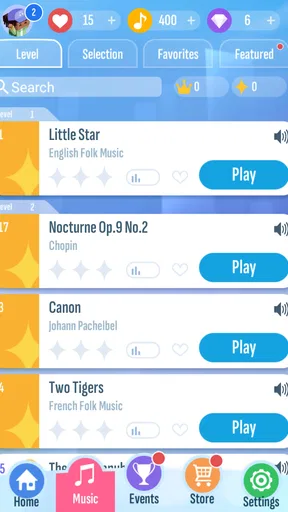
Alright, let’s talk about the music. What's a game about piano tiles without a killer soundtrack, right? Piano Tiles 2™ shines here with an extensive library of tunes. Whether you’re into Beethoven or modern hits, there's something for everyone. Each track is beautifully rendered, making you feel like a virtuoso with just a few taps.
The music quality is top-notch, and the game nails the feeling of playing a real piano. It's a great way to introduce yourself to new music while playing, and I found myself humming the tunes long after I put the game down.
Choosing the right moment to play
A realistic use case is a short wait when you are alert enough to concentrate but have no time to start a longer game. I would open it while waiting for a ride or taking a break, play a run or two, then put the phone away when the next task begins. That makes the quick rounds feel like a welcome reset instead of a commitment. I would skip it while walking, crossing a street, or doing anything that needs your eyes elsewhere: the whole point is to watch the tiles, and a distraction-heavy setting makes mistakes more likely.
It is also a better fit for someone who likes repeating a compact challenge than for someone who wants a story, exploration, or a calm background activity. The rising pace can turn a relaxed start into a tense finish. If you want music to remain in the background while you unwind, a playlist is the easier choice; if you want your hands and attention involved, this game gives you a clearer goal.
Challenges and Competition
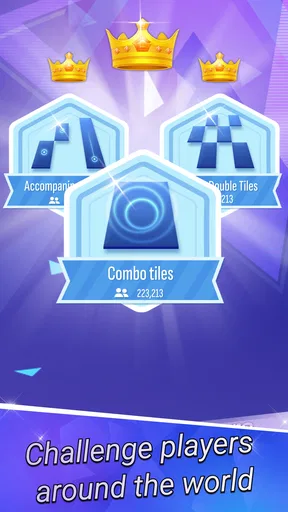
If you're a competitive soul like me, you’ll love the leaderboard feature. It turns every game into a battle, not just with yourself but with players worldwide. There’s a real sense of achievement when you climb up the ranks, besting your previous scores and challenging friends.
The game also includes various challenges and events, which keep things exciting. It’s not just about tapping tiles anymore; it’s about beating your best and showing off your skills to the world.
Improving without turning it into a chore
When a run goes badly, I find it more useful to notice what caused the miss than to immediately restart in frustration. Was I looking too far ahead, rushing a pattern, or playing while distracted? A brief pause can help reset your attention. Then aim for steadier taps on the next attempt. This is a simple but useful way to make repeat play feel purposeful: choose one thing to improve rather than treating every run as a test of your reflexes.
Competition can be motivating, but it can also change the mood of a casual game. I would use the leaderboard as a personal progress marker first and compare with other players only if that makes the experience more fun. If scores or rankings start to make a short break feel like pressure, there is no need to chase them; the basic tile-tapping challenge still works without turning every session into a contest.
In-App Purchases and Ads
Now, let’s chat about the not-so-glamorous side. Yes, the game does include ads and in-app purchases. It can be a bit of a buzzkill when an ad pops up in the middle of your groove. However, I found that the ads are not overly intrusive, and you can continue playing without spending a dime if you’re patient.
If you’re really loving the game, there are options to purchase songs or remove ads, enhancing your experience. But again, it’s totally up to you how you want to play.
Keeping spending in perspective
Because the download is free but optional purchases are available, I would try the basic play loop before deciding whether anything extra is worth it. The in-app purchase range runs from $0.99 to $299.99 per item, a wide spread that makes it sensible to check each item carefully rather than assuming every purchase is a small add-on. If you are setting up a device for a child, the Everyone age rating is reassuring as a content label, but it does not replace a conversation about purchases or a family rule for spending.
For me, the best way to judge the ads is in context: a brief interruption is more noticeable when you are in a focused run than when you are casually trying the game. If an interruption breaks your concentration, that may be a reason to stop after a few rounds rather than keep playing longer than you intended. The free option is enough to find out whether the tapping itself is enjoyable before spending money.
Who will enjoy it—and who may not
I would recommend this to someone who wants a quick, hands-on music game, likes improving through repetition, and is happy to focus on a small play area. It can also work as a light shared activity at a gathering: take turns trying a short run and compare how each person handles the pace. The controls are straightforward enough that a newcomer can understand the goal quickly, even if getting consistent takes practice.
On the other hand, it is not my pick for a player who wants a true piano simulator, a structured music course, or a story-driven game. Nor is it ideal if rapid visual changes are uncomfortable or if you prefer games that can be played without looking continuously at the screen. A slower puzzle or an audio-first music app is likely a better fit in those cases.
Final Thoughts
Overall, Piano Tiles 2™ is a gem of a game. It’s perfect for those moments when you need a quick escape or just want to challenge yourself. The combination of simple gameplay, a stunning soundtrack, and competitive elements makes it a standout in the app world.
If you’re looking to turn your boring bus rides into mini concerts or just want a fun way to improve your reflexes, give it a try. You might just find yourself tapping along to tunes you never knew you loved. Happy tapping!
A sensible final check before installing
Released on October 6, 2023, this music game has a straightforward proposition: quick tile-focused play, familiar piano sounds, and reasons to repeat a run. I would install it if that combination sounds appealing, while keeping expectations grounded: it is a casual rhythm challenge, not a substitute for lessons or a full-featured instrument app. Its 4.3 average and large audience make it an established option in the category, but your own first few attempts are the best test of whether the speed feels exciting or simply stressful.
So my practical recommendation is simple: try a short session, learn the timing at your own pace, and decide whether you enjoy the challenge before considering purchases or chasing scores. If the rhythm gets you smiling, it is an easy game to return to during spare moments. If you keep wishing for more musical control or less pressure, choose a different kind of music app instead.
Pros
- Engaging and addictive gameplay.
- Wide variety of songs to choose from.
- Simple and intuitive controls.
- Regular updates with new content.
- Offline mode available for play.
Cons
- In-app purchases can be pricey.
- Ads can interrupt gameplay.
- Requires precision
- which can be frustrating.
- No option to customize song difficulty.
- Limited free song selection.
FAQs for Piano Tiles 2™ - Piano Game
What is Piano Tiles 2™ and how does it work?
Piano Tiles 2™ is a rhythm-based mobile game that challenges players to tap black tiles as they scroll down the screen to the beat of classical and modern music tracks. The objective is to keep up with the pace of the music without missing any tiles or tapping on white ones. It's a test of both reflexes and musical timing.
Is Piano Tiles 2™ free to play?
Yes, Piano Tiles 2™ is free to download and play. However, it offers in-app purchases that can enhance the gaming experience. Players can buy additional songs, remove ads, or purchase game currency to unlock more content. It's important to be aware of these optional purchases, especially if children are playing.
What devices support Piano Tiles 2™?
Piano Tiles 2™ is available on both Android and iOS platforms. It requires Android version 4.1 and up or iOS version 8.0 and later. It's optimized for mobile devices, ensuring a smooth gameplay experience on most smartphones and tablets. Always check that your device meets these requirements before downloading.
Are there different game modes in Piano Tiles 2™?
Yes, Piano Tiles 2™ offers several game modes, including Classic, Arcade, and Zen modes. Each mode provides a unique challenge, such as playing without mistakes in Classic, achieving high scores in Arcade, or playing within a time limit in Zen. This variety keeps the gameplay fresh and engaging for different types of players.
How can players improve their skills in Piano Tiles 2™?
Improving skills in Piano Tiles 2™ involves regular practice and familiarizing oneself with various songs. Players can start with slower tracks to build confidence and gradually progress to more challenging ones. Utilizing headphones can also help focus on the rhythm, enhancing timing and accuracy. Joining the game's community for tips and challenges is another great way to improve.


